
How to Fix Tech Neck Posture: A Step-by-Step Guide
Last Updated: October 23, 2026
Quick Summary
To fix tech neck posture, strengthen your deep neck muscles with chin tucks performed three times daily, stretch tight muscles for 20 to 30 seconds daily, position your monitor at eye level, and take movement breaks every 20 to 30 minutes. Most people see noticeable improvements within four to six weeks with consistent effort.
- Chin tucks are the single most effective exercise for tech neck, targeting deep cervical flexors and improving head alignment.
- Position your monitor at eye level about 20 to 26 inches from your eyes to prevent forward head posture.
- Every 20 minutes, take a 20-second break and look at something 20 feet away using the 20-20-20 rule.
- Perform a five-minute daily posture reset routine combining chin tucks, neck stretches, shoulder rolls, and chest stretches.
- Strengthen your core and upper back three times weekly with exercises like planks, rows, and reverse flies for lasting results.
Table of Contents
- What Tech Neck Posture Is and Why It Develops
- Recognizing Tech Neck Symptoms and When to Seek Medical Help
- Tech Neck Exercises for Strengthening Deep Neck Muscles
- Tech Neck Stretches and Mobility Work
- Screen Height for Neck Pain and Ergonomic Setup
- How to Relieve Neck Tension Throughout Your Workday
- Building a Complete Workday Plan for Posture Recovery
- Strengthening Your Core and Upper Body for Lasting Results
- Frequently Asked Questions
What Tech Neck Posture Is and Why It Develops
Tech neck posture is a forward head tilt caused by prolonged screen use, straining neck muscles and shifting head weight onto your cervical spine.
Your head weighs 10 to 12 pounds when balanced over your shoulders. Tilt it forward 15 degrees and your neck feels 27 pounds of pressure; at 45 degrees, that jumps to 49 pounds.
How forward head posture creates neck pain
When your head moves forward, your upper back muscles work overtime, your neck flexors tighten, and your upper trapezius and levator scapulae become overworked, muscles not designed to hold your head there for eight hours straight.
The result is a cascade of problems:
- Neck pain and stiffness
- Shoulder tension and soreness
- Headaches radiating from the base of your skull
Your spine also compresses unevenly. The discs between your vertebrae experience uneven pressure. Over months and years, this can lead to degenerative changes and chronic pain that becomes harder to manage.
Common causes: screen use, phone use, and prolonged sitting
Screen use at work is the primary culprit. Most office workers position monitors too low or too far away, forcing them to crane their necks downward and forward for eight hours daily.
Phone use compounds the problem. Many people spend two to three hours daily looking down at their phones, adding constant forward head posture stress.
Prolonged sitting without movement breaks locks your muscles in place.
Recognizing Tech Neck Symptoms and When to Seek Medical Help
Tech neck symptoms develop gradually, and most people don't notice until pain becomes unavoidable.
Early symptoms are mild:
- Slight neck discomfort after long work sessions
- Stiffness that improves with movement
- Mild tension in your upper shoulders
As tech neck progresses, symptoms become more persistent:
- Constant neck pain and soreness
- Reduced ability to turn your head fully
- Pain that radiates into your shoulders and arms
When to seek professional help: See a provider for numbness, tingling, or radiating arm pain, which suggest nerve compression.
A chiropractor or physical therapist can assess your posture, identify muscle imbalances, rule out serious conditions, and create a personalized exercise plan.
Tech Neck Exercises for Strengthening Deep Neck Muscles
Strengthening your deep neck muscles is the foundation for fixing tech neck posture. These stabilizing muscles support your spine and hold your head in proper alignment.
The exercises below progress from basic to challenging. Start with chin tucks for two weeks before adding the next progression. Mild muscle fatigue is normal; sharp pain is not.
Chin tucks: the foundation exercise
Chin tucks are the single most effective exercise for tech neck, targeting your deep cervical flexors and improving head alignment.
How to perform chin tucks:
- Sit upright in a chair with your shoulders relaxed
- Keep your eyes forward
- Draw your chin straight back, as if making a double chin
- Hold this position for two seconds
- Release and return to neutral
- Repeat for 15 reps, three times per day
The movement is small: you should feel a gentle contraction under your chin and along your neck.
Progression: Once chin tucks feel easy, add resistance. Place two fingers under your chin and gently push forward while you resist with your neck muscles.
Neck strengthening progression
After two weeks of chin tucks, add these strengthening exercises to build deeper stability.
Isometric neck holds (weeks 3-4):
- Sit upright with good posture
- Place your hand against the side of your head
- Push your head against your hand without moving
Neck resistance band work (weeks 5+):
- Loop a resistance band around your neck at the back of your head
- Hold the ends with both hands
- Gently pull the band forward while resisting with your neck
Strengthen your upper back and shoulders too, rows, reverse flies, and wall angels build the stability that supports your neck and head alignment.
Tech Neck Stretches and Mobility Work
Stretching complements strengthening: stretches restore flexibility and reduce tension from prolonged screen use. Perform these daily, holding each for 20 to 30 seconds.
Hand-to-ear stretch and lateral neck muscles
Hand-to-ear stretches target the lateral neck muscles that become tight from tech neck posture.
How to perform:
- Sit upright with good posture
- Reach your right hand over the top of your head
- Gently pull your right ear toward your right shoulder
- Keep your shoulders relaxed and avoid hunching
- Hold for 25 seconds and feel the stretch along the left side of your neck
- Return to center and repeat on the opposite side
- Perform three sets of two reps per side, daily
Don't force the stretch, you should feel gentle tension, not pain. The goal is gradual range-of-motion gains over weeks, not maximum stretch on day one.
Upper body posture stretches
Your upper back and chest also need attention. Tight chest muscles pull your shoulders forward and contribute to forward head posture.
Doorway chest stretch:
- Stand in a doorway with your right arm raised to 90 degrees against the door frame
- Step forward until you feel a gentle stretch across your chest
- Hold for 25 seconds
Neck extension stretch:
- Sit upright in a chair
- Gently tilt your head backward, looking slightly up
- Place your hands behind your head for light support
Combine these stretches with your strengthening exercises, stretching afterward when muscles are warm. Strength plus mobility creates lasting posture improvement.
Screen Height for Neck Pain and Ergonomic Setup
Your workstation setup is the first line of defense against tech neck. Poor ergonomics force your body into damaging positions for hours daily.
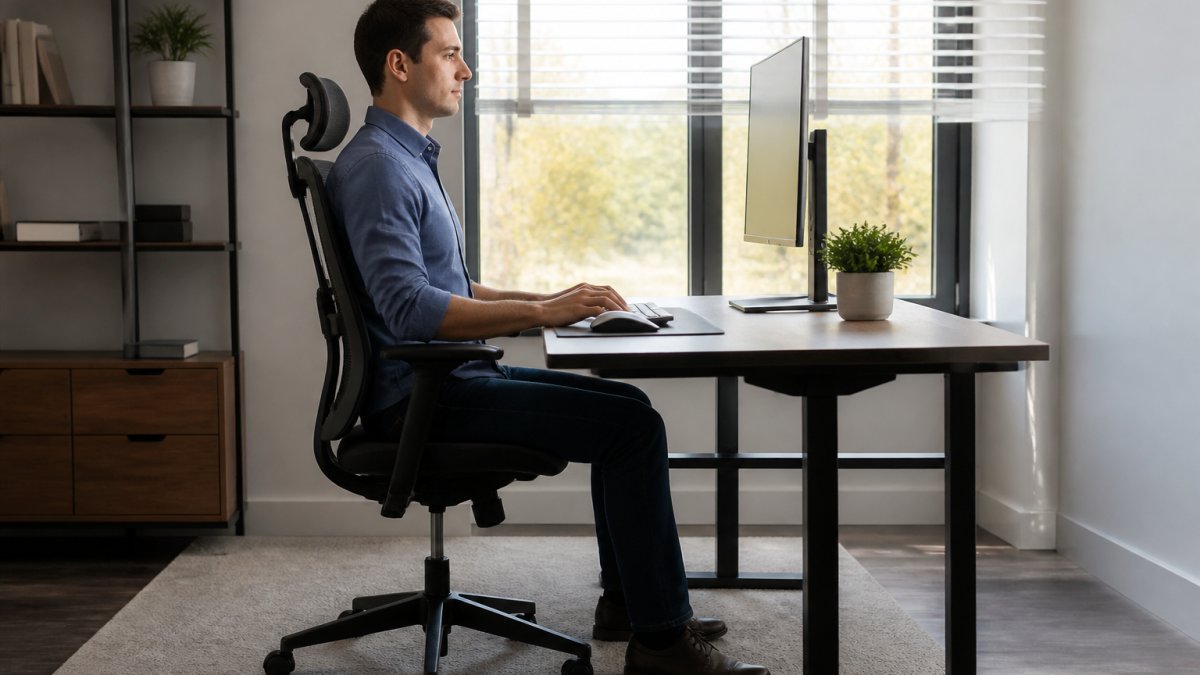
Positioning monitors, phones, and tablets correctly
Monitor positioning is critical. Your screen should sit at eye level when you're sitting upright.
Distance matters too. Position your monitor about 20 to 26 inches from your eyes, roughly an arm's length, to reduce eye strain and prevent leaning forward.
Phone and tablet use requires intentional adjustment.
Laptop use creates special challenges because laptop screens sit too low.
Workstation adjustments for different devices
For desk workers:
- Raise your monitor to eye level using a monitor stand or arm
- Keep your keyboard and mouse at elbow height
- Sit with your back against your chair, not hunched forward
For mobile phone users:
- Hold your phone at eye level when texting or reading
- Use voice-to-text for long messages
- Take regular breaks from phone use, at least every 30 minutes
For hybrid workers:
- Invest in a laptop stand and external keyboard for home use
- Maintain the same ergonomic setup whether you're at home or the office
- Adjust your setup if you work from different locations
Small adjustments create big changes. Even raising your monitor by just six inches can significantly reduce neck strain and forward head posture.
How to Relieve Neck Tension Throughout Your Workday
Preventing tech neck requires breaking up prolonged static posture. Your muscles aren't designed to stay in one position for hours; movement and position changes throughout the day prevent tension buildup and maintain strength.
Movement breaks and mini-breaks from screen use
The 20-20-20 rule is simple and effective. Every 20 minutes, take a 20-second break and look at something 20 feet away.
Hourly movement breaks are even better. Stand up, walk around, and perform a few quick stretches every hour.
Micro-movements throughout the day add up:
- Roll your shoulders backward five times every 30 minutes
- Perform two chin tucks every hour
- Turn your head slowly left and right five times per hour
These tiny movements take 30 seconds but interrupt the static posture cycle, keeping your muscles engaged and preventing the tension that builds from sitting still.
A five-minute daily routine to reset posture
Perform this routine once during your workday, ideally at lunch or mid-afternoon when tension peaks.
Five-minute posture reset:
- Chin tucks (1 minute): Perform 20 slow, controlled chin tucks
- Neck stretches (1.5 minutes): Hold each side for 30 seconds, both sides
- Shoulder rolls (30 seconds): Slow backward rolls, five reps
- Doorway chest stretch (1 minute): Hold for 30 seconds per side
- Posture check (30 seconds): Sit upright, shoulders back, head neutral
This five-minute routine resets your posture and reduces accumulated tension. Perform it daily for best results.
Building a Complete Workday Plan for Posture Recovery
Creating a structured plan makes posture recovery automatic. Instead of relying on willpower, you build habits that support good posture throughout your day.
Morning routine and sitting posture habits
Start your day with intention. A morning posture routine sets the tone for the entire day.
Morning posture routine (5 minutes):
- Perform 15 chin tucks
- Hold a hand-to-ear stretch for 25 seconds per side
- Do five slow shoulder rolls backward
This morning routine activates your postural muscles and reminds your body how good posture feels, making it easier to maintain throughout the day.
Sitting posture habits:
- Sit with your back against your chair
- Keep your shoulders relaxed, not shrugged up
- Position your monitor at eye level
Hourly reminders and exercise integration
Set phone reminders to interrupt long sitting sessions. These reminders break the cycle of prolonged static posture.
Hourly routine (2 minutes):
- Stand up and walk for one minute
- Perform five chin tucks
- Perform five shoulder rolls backward
End-of-day routine (3 minutes):
- Perform the five-minute posture reset described above
- Assess any tension or discomfort
- Plan adjustments for tomorrow if needed
Consistency matters more than perfection. Even performing these routines four days per week creates noticeable improvements within two weeks.
Strengthening Your Core and Upper Body for Lasting Results
Your neck doesn't work in isolation.
Core strengthening supports your spine and reduces strain on your neck.
Upper back strengthening is equally important.
Shoulder stability work prevents your shoulders from rounding forward.
A complete strength routine takes 20 to 30 minutes, three times per week. This investment prevents tech neck from returning and improves overall posture and spinal health.
At PosturePlank, we've designed the PosturePlank FLEX specifically to address these deep stability issues.

The PosturePlank FLEX works alongside these exercises.
Fixing tech neck posture requires a multi-pronged approach. Strengthen your deep neck muscles with chin tucks. Stretch your tight muscles daily. Fix your workstation ergonomics. Take regular movement breaks. Build your core and upper back strength. Combine these strategies and you'll reverse tech neck within four to six weeks.
The key is consistency. Small daily actions compound into major posture improvements.
According to the American Chiropractic Association, poor posture contributes to chronic neck and shoulder pain affecting millions of office workers.
Research from occupational health studies on screen-based work shows that proper workstation ergonomics reduce neck strain by up to 50 percent.
The National Institutes of Health guidance on neck pain management emphasizes that exercise and posture correction are the first-line treatments for tech neck symptoms.
Ready to rebuild your posture from the ground up? PosturePlank FLEX provides the deep stability training your body needs to maintain good posture automatically. Combined with the exercises and habits in this guide, it accelerates your posture recovery and prevents tech neck from returning. Add PosturePlank FLEX to your routine today and experience the difference that real spinal stability creates.
Frequently Asked Questions
What are the main symptoms of tech neck, and when should I see a doctor?
Tech neck typically causes neck stiffness, soreness, and discomfort in the neck and shoulders, especially after prolonged screen use. You may also experience headaches or upper back tension. Seek medical evaluation if symptoms persist beyond two weeks, worsen despite home care, involve numbness or tingling, or follow an injury. A healthcare provider can rule out underlying conditions like herniated discs or nerve compression.
How often should I do tech neck exercises and stretches?
Perform stretches and strengthening exercises at least once daily, ideally twice. Chin tucks can be done hourly during work breaks. Start with 10-15 repetitions per exercise and progress gradually. Consistency matters more than intensity. Consistent practice combined with ergonomic adjustments can lead to improved neck posture and reduced discomfort.
How should I position my screen to reduce tech neck symptoms?
Position your monitor so the top of the screen is at or slightly below eye level when sitting with good posture. The screen should be 20-26 inches from your eyes and directly in front of you, not angled down. For phones and tablets, hold them at eye level rather than looking down. Proper screen height for neck pain prevention reduces strain on neck muscles and helps maintain neutral head alignment throughout your workday.
Can I really fix tech neck posture on my own, or do I need professional help?
Many people successfully improve tech neck posture through self-directed exercises, stretches, and ergonomic changes. However, if you have chronic pain, a history of neck injury, or haven't seen improvement after four weeks of consistent effort, consult a chiropractor or physical therapist. A professional can assess your specific posture issues, rule out serious conditions, and create a personalized plan. Tools like PosturePlank FLEX can support your recovery by training the deep stabilizing muscles that support proper spinal alignment.
